
.jpg?width=900&name=Case%20Study%20(100).jpg)
Expert Power Platform support means having people who know the platform look after the apps, flows and reports your organisation already relies on, so they keep working when the person who built them moves on or the business asks for more. A good support partner fixes faults quickly, but also documents what you have, puts proper environments and deployment in place, and trains your own people so they rely on the partner less over time.
ThinkShare takes on Power Platform solutions that were built internally or by another supplier and supports them on an ongoing basis, balancing day-to-day fixes with longer term planning and knowledge transfer. We start with a review of how each solution was built and where the risks are, and work from there.
Why does Power Platform need ongoing support?
Power Apps, Power Automate and Power BI let people outside IT build useful things quickly, which is the whole point of a low-code platform. The difficulty tends to come a year or two later. An app someone in operations built to solve one problem becomes business critical, more teams start using it, and nobody has written down how it works. If that person leaves, or the app needs to do more, there is no one who can change it safely.
The platform itself also changes a lot. Microsoft updates Power Apps, Power Automate, Power BI and Copilot Studio continually, has added Copilot to the maker tools, and keeps adding admin and governance features to the Power Platform admin center. Someone needs to keep track of what those changes mean for the solutions you already have, and whether any of the new features are worth using.
What problems do we see when Power Platform solutions are built without support?
We take over a fair number of existing solutions, and the same issues come up again and again.
Solutions built in the wrong environment
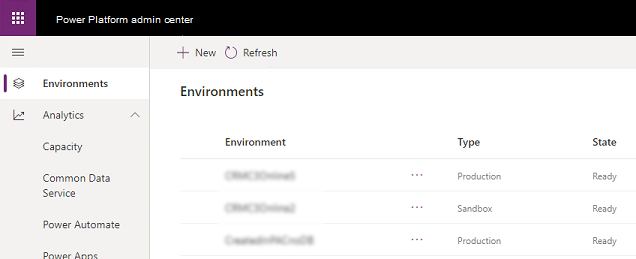
Every tenant has a default environment, and it's where things end up unless someone decides otherwise. Flows created from the Workflows app in Microsoft Teams, for example, are always created in the default environment. That's fine for personal productivity, but business-critical apps and data models sitting in there alongside everyone's experiments is a risk, because it's hard to control who can see and change them and there's no separation between the version being worked on and the version people are using.
We look at where your solutions live and set up a sensible structure, usually separate development, test and production environments, so changes can be built and tested without affecting anyone using the live app.
No documentation
An undocumented app is only as safe as the memory of the person who built it. Without a record of what each screen, flow and data source does, troubleshooting takes far longer than it should, changes break things nobody expected, and new team members have to work it all out from scratch.
Part of our support is documenting what you have: what the solution does, where its data lives, which connections and licences it depends on, and who can access it. That makes faults quicker to fix and makes it much easier to bring someone new up to speed.
No proper lifecycle management
Microsoft's approach to application lifecycle management (ALM) is built around solutions, which package apps, flows, tables and agents so they can be moved from one environment to another. Environments that take part in ALM need a Dataverse database. Pipelines in Power Platform then let an admin set up deployments so a maker can move a solution from development to test to production in a few clicks, rather than exporting and importing files by hand.
Without any of this, changes get made directly in the live app and there's no easy way back if something goes wrong. Connections also tend to belong to whoever built each flow, so the flows stop working when that person's account is disabled. Pipelines support deploying with a service principal, which avoids that problem.
Governance left until later
As the number of people building apps and flows grows, IT needs to know what exists and who can share it. Managed Environments are a set of premium admin capabilities in Power Platform, including sharing limits, data policies, weekly usage insights and the solution checker, that help with exactly that. Licensing causes problems too. Users with a Microsoft 365 licence can use the standard connectors, but premium, on-premises and custom connectors need a standalone Power Apps or Power Automate licence, so a solution that works for its builder during testing can fail for everyone else.
What does a Power Platform support contract include?
Our support covers Power Apps, Power Automate flows, Power BI reports and Power Pages sites, whether we built them or someone else did. Typically that includes:
- fixing faults and finding the root cause, working with your IT team
- monitoring flow run history, licences and capacity so problems are spotted early
- keeping solutions working as Microsoft changes the platform
- adjusting apps and flows as your own processes change
- documenting solutions and moving them into properly structured environments
- advice on new features, adoption and security, including role-based access
How does knowledge transfer work?
We would rather your team became confident running their own solutions than called us for every small change. Throughout a support contract we set time aside to show your people how their apps and flows are built, how to make routine changes safely, and how to use the environments and pipelines we've set up. Over time the support shifts from fixing things towards planning what to build next.
Frequently asked questions
Can you support Power Platform apps that another supplier built?
Yes. We regularly take over existing solutions built internally or by other partners. We start with a review of how each one was built, where its data and connections sit, and where the risks are, then agree what needs to change.
Do we need Dataverse to manage Power Platform properly?
For Microsoft's built-in lifecycle management tools, yes. Solutions and pipelines rely on Dataverse, and Microsoft's guidance is that every environment taking part in ALM needs a Dataverse database. Apps that store data in SharePoint lists can still be packaged in solutions.
What happens to our flows if the person who built them leaves?
If the flows use that person's own connections, they can stop running once the account is disabled. Moving important flows into solutions, adding co-owners and deploying with a service principal through Power Platform pipelines all reduce that risk.
Do we need extra licences to use Power Platform?
Users with a Microsoft 365 licence can build flows that use the standard connectors. Premium, on-premises and custom connectors need a standalone Power Apps or Power Automate licence, and Managed Environments are a premium capability, so it's worth checking who needs what before a solution is rolled out widely.
Talk to us about Power Platform support
If you have Power Platform solutions that the business depends on and nobody is really looking after, get in touch and we can arrange a review. You can read more about how we work on our Power Platform support page, or see how Power Platform can help your business.

/SharePoint%20Migration/Half-Screen-Image-Size-%20people%20writing%20on%20glass.png?width=800&name=Half-Screen-Image-Size-%20people%20writing%20on%20glass.png)
/Individuals%20working%20off%20different%20devices%20at%20a%20desk..png?width=800&name=Individuals%20working%20off%20different%20devices%20at%20a%20desk..png)