

Keeping on top of how a website performs in search is a weekly job. Someone has to pull the numbers out of Google Search Console, work out which pages are close to page one, rewrite the titles and descriptions that are holding them back, and then write up what changed. We've built an agent in Microsoft Foundry that does that job for thinkshare.co.uk.
Its main focus is SEO, which is how our pages rank in Google. It writes descriptions that answer the question someone actually searched for, so the same work also helps with AEO (answer engine optimisation). AEO is how likely a page is to be picked up by AI assistants such as Copilot and ChatGPT.
It's a good example of the kind of internal agent we build. It takes a routine, data-heavy process, does the gathering and the first draft, and leaves the decisions with a person.
What it does each week
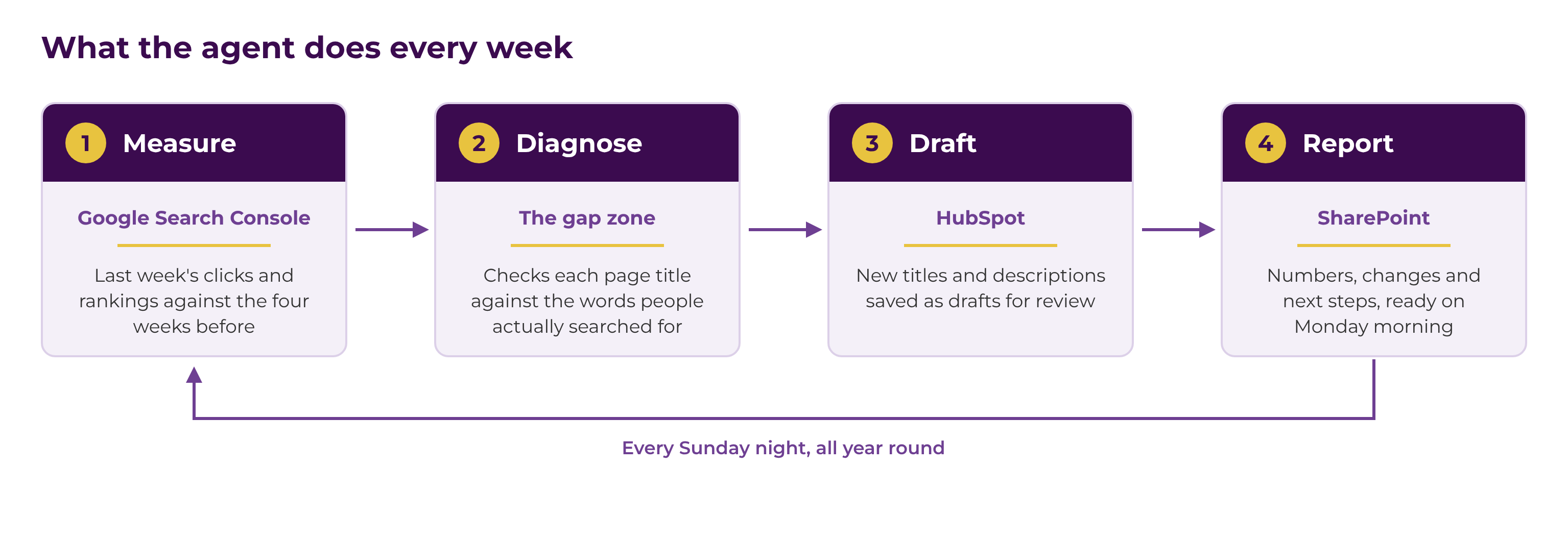
The agent works through the same four steps every week:
- Measure: it pulls last week's clicks, impressions, click-through rate and average position from Google Search Console and compares them with the four weeks before.
- Diagnose: for the queries with the most potential, it checks whether the title and description of the page that ranks match what people searched for.
- Draft: it puts improved titles and meta descriptions straight into the page's draft in HubSpot. Where a page needs more than new metadata, it writes a content brief instead.
- Report: it saves a report in SharePoint with the numbers against the previous month, every change page by page with the before and after, and the three things most worth our time the following week.
Where it spends its time
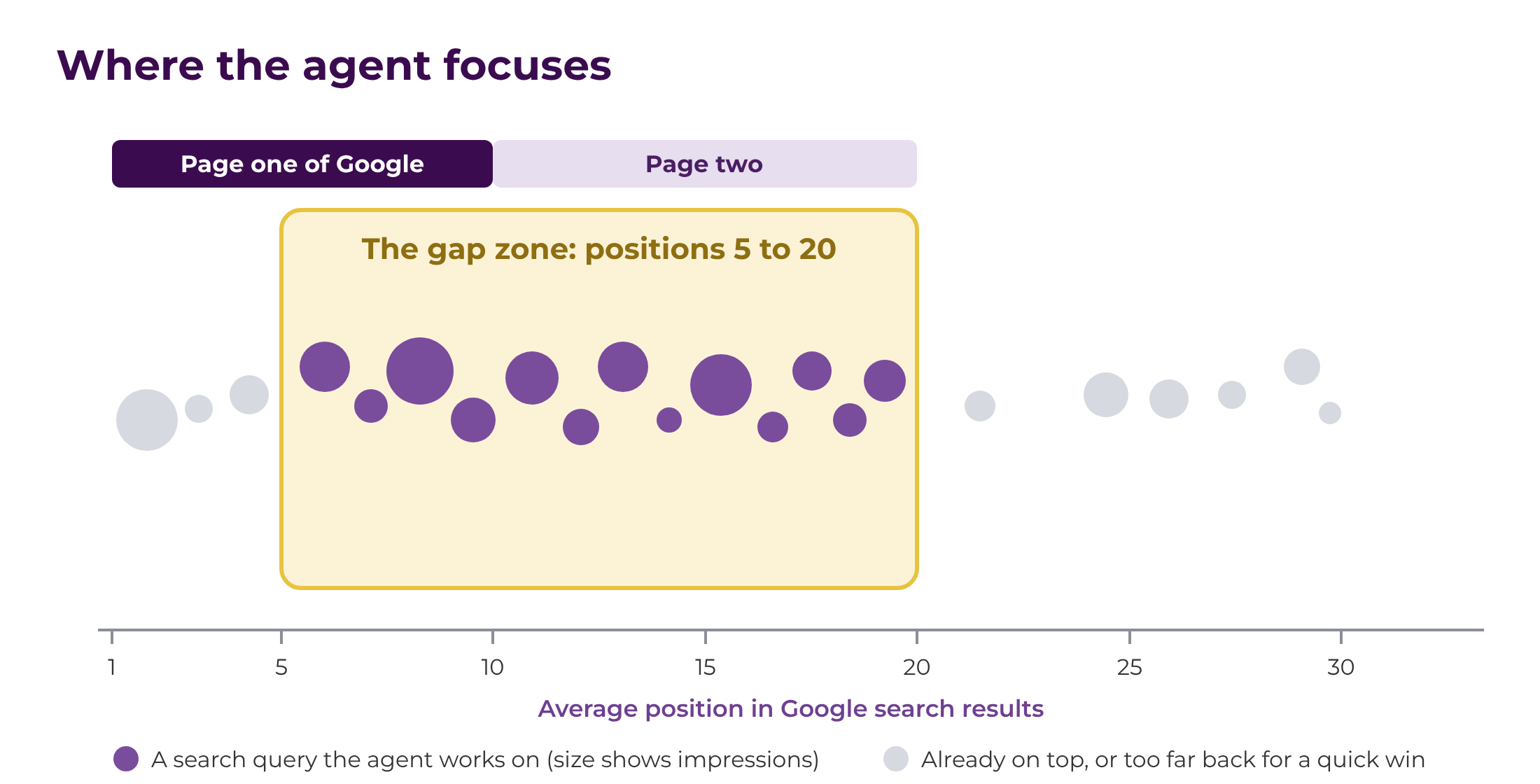
Pages on page one of Google get almost all the clicks, but moving a page from position 40 to page one is a lot of work. Queries already ranking between positions 5 and 20 with a reasonable number of impressions move for the least effort. Often all they need is a title that uses the words people search for, so that's where the agent concentrates.
What it runs on
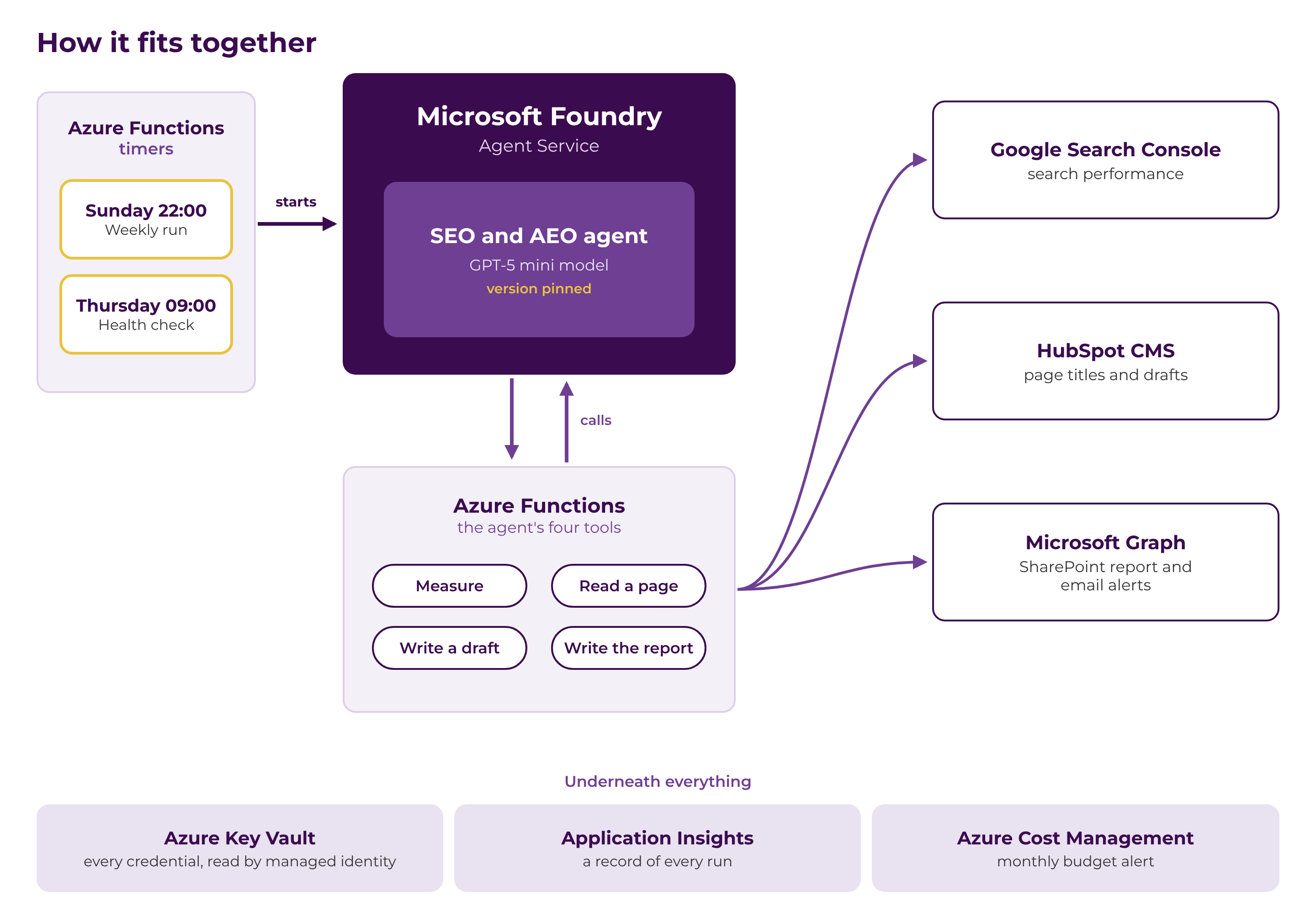
Everything runs on Microsoft Azure, with each part doing one job:
- Foundry Agent Service in Microsoft Foundry runs the agent itself on a GPT-5 mini model. The model is deployed in our own Azure subscription and pinned to a fixed version, so its behaviour doesn't change unless we decide it should.
- Azure Functions hosts the four tools the agent is allowed to use: measure, read a page, write a draft and write the report. Two timer functions start the weekly run and a midweek health check.
- Azure Key Vault holds every credential. Nothing sensitive sits in the code, and each part of the system uses its own managed identity to read only what it needs.
- Microsoft Graph saves the report to a dedicated SharePoint site and sends alerts from a shared mailbox. The permissions are limited to that one site and that one mailbox.
- Application Insights and Azure Cost Management keep a record of every run and alert us if spending goes over a monthly budget.
How a week runs
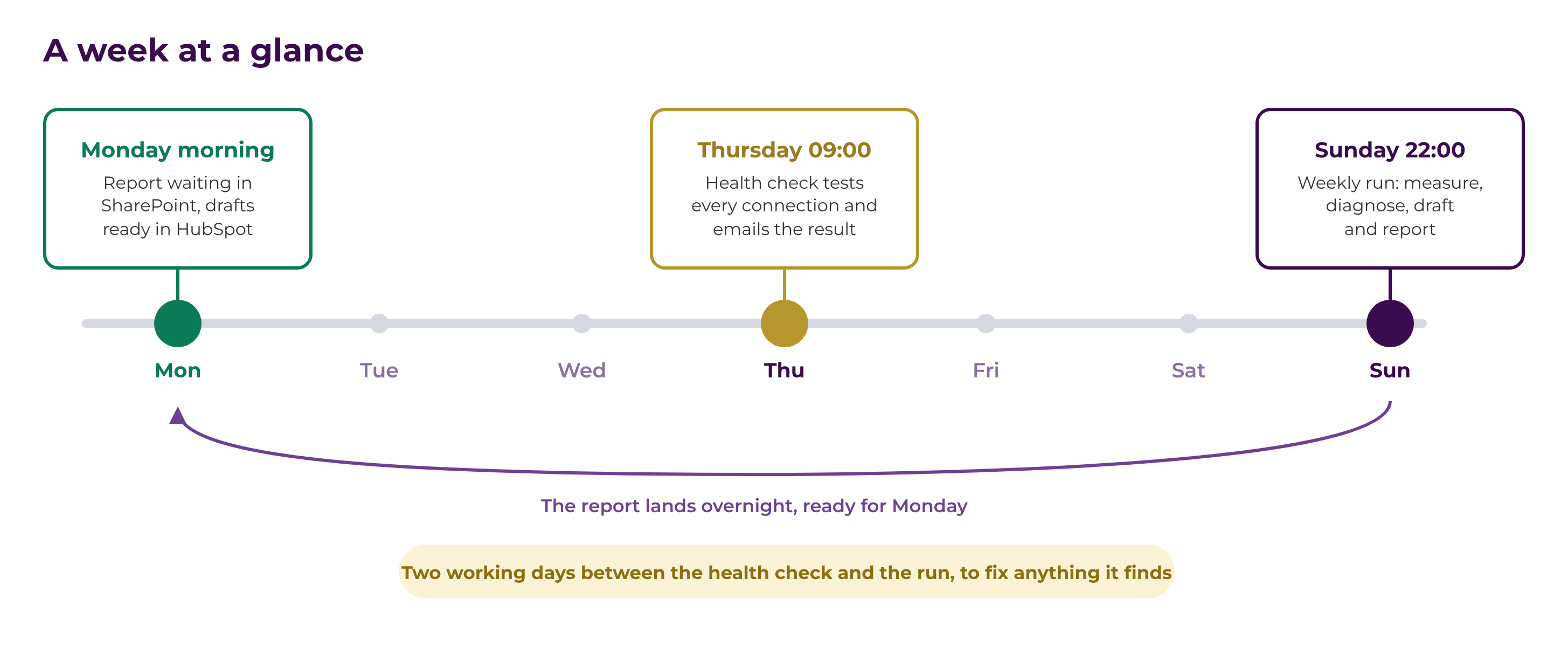
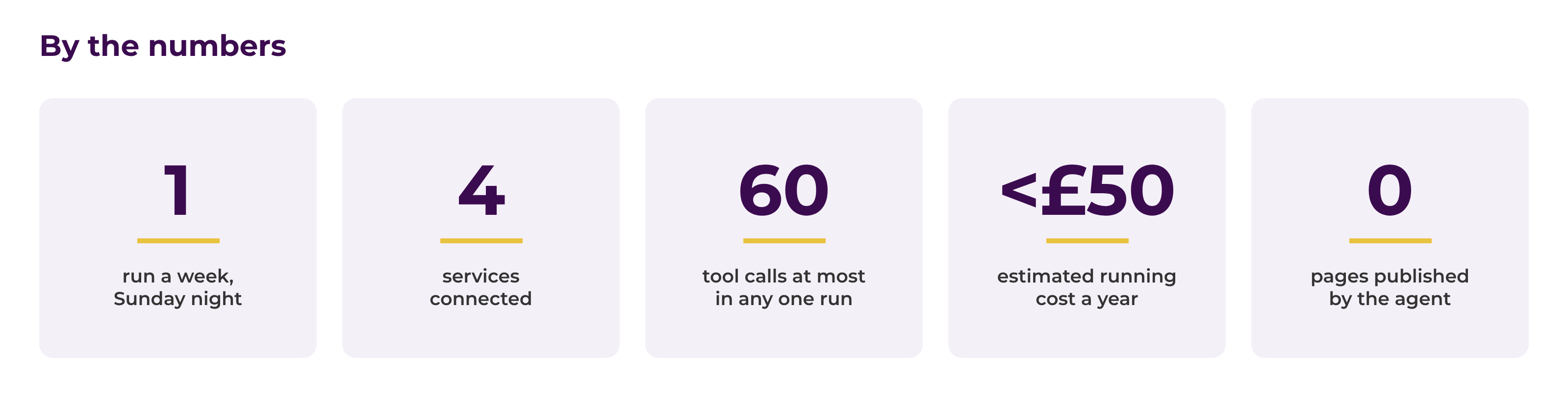
The main run starts at 10pm on Sunday, so the report and the drafts are there first thing on Monday. At 9am on Thursday a much lighter health check runs. It tests every connection the Sunday run depends on and emails us the result, which gives us two working days to fix anything before it matters.
Guardrails
An agent that can change a website needs firm limits. We've built them into the system rather than leaving them to the AI's judgement:
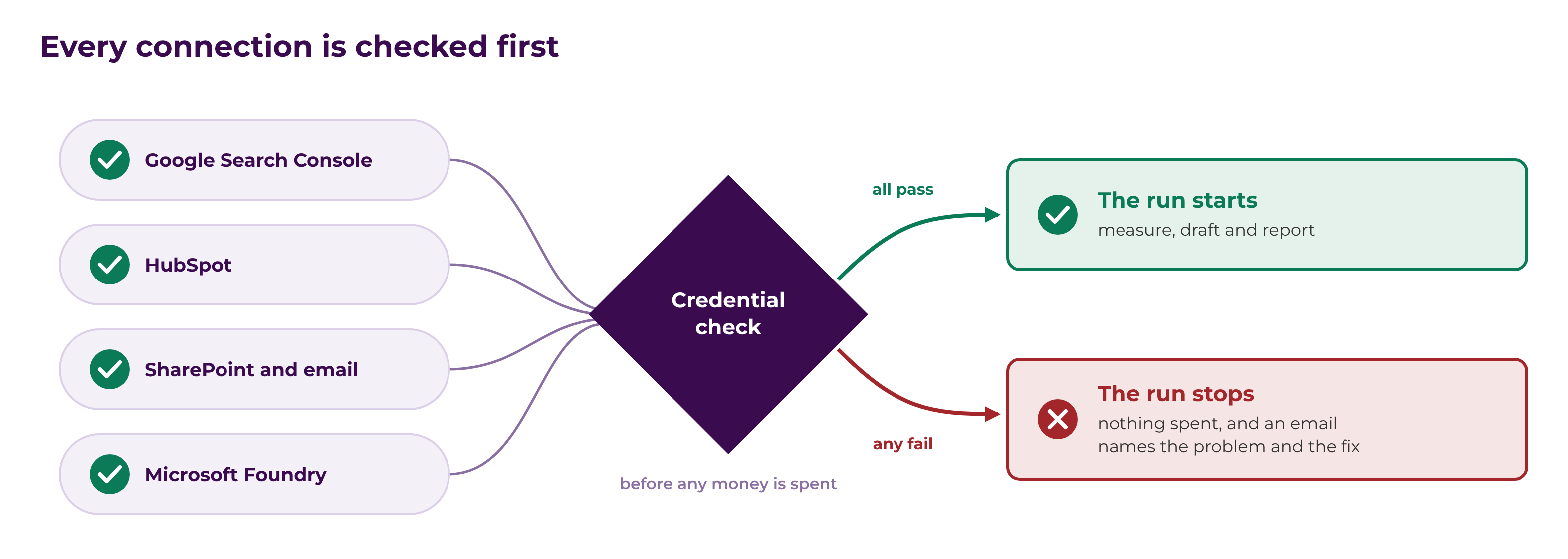
- Connections are checked first. Before the model is called, the agent checks it can reach Search Console, HubSpot, SharePoint and Microsoft Foundry. If any of them fails, the run stops before it has spent anything and the email says what broke and how to fix it.
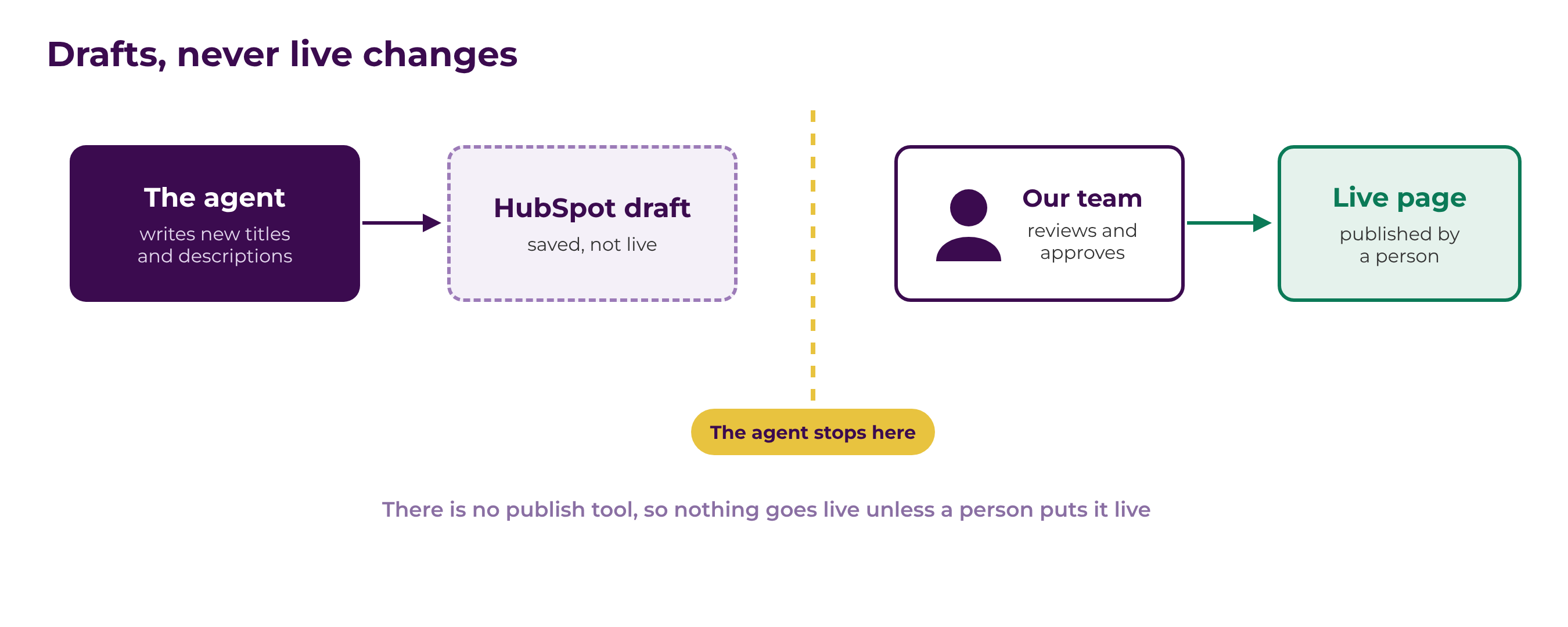
- Drafts only, never live changes. Every change sits in HubSpot until someone on our team reviews it and publishes it. The agent has no publish tool to call, so this doesn't depend on the AI behaving itself.
- A limit on every run. Each run is capped at 60 tool calls, against about 42 in a normal week, and the agent can only run once a day.
A Copilot agent front end
The agent also has a front end in Microsoft 365 Copilot, so anyone on the team can talk to it as a Copilot agent from Copilot Chat or Teams, asking how a page did last week, why a title was changed, or for a fresh draft of a description, without waiting for the weekly run.
We published it from Foundry Agent Service to Microsoft 365 Copilot and Teams, where it sits in the agent store as a custom engine agent. Publishing creates an Azure Bot Service resource and the Microsoft 365 app package, and turns on the Activity Protocol endpoint that Copilot and Teams use to pass messages to the agent. Behind the chat it's the same Foundry agent, with the same tools and the same guardrails as the weekly run, so anything it drafts still sits in HubSpot until someone on our team reviews it and publishes it.
What it costs
We estimate the running cost at under £50 a year. It's on pay-as-you-go Azure, the model is only used once a week, and there's a monthly budget alert behind it in case anything unexpected happens.
Building agents like this for your organisation
We built this the same way we'd build an agent for a customer: in your own Microsoft tenant, with your own credentials, and with a person signing off anything that goes live. Any weekly process that follows the same pattern is a good candidate: gather the data, work out what needs doing, and prepare the work for someone to approve. If you've got one in mind, get in touch and we can talk it through.
/Power%20Apps/Copilot%20%26%20AI-03.jpg?width=800&name=Copilot%20&%20AI-03.jpg)
/SharePoint%20Migration/Half-Screen-Image-Size-%20people%20writing%20on%20glass.png?width=800&name=Half-Screen-Image-Size-%20people%20writing%20on%20glass.png)
/Individuals%20working%20off%20different%20devices%20at%20a%20desk..png?width=800&name=Individuals%20working%20off%20different%20devices%20at%20a%20desk..png)