
.jpg?width=900&name=CaseStudy_400px%20(132).jpg)
Power Apps solves business challenges by letting you build custom apps for the processes that off-the-shelf software doesn't fit, such as replacing paper forms and spreadsheets, routing approvals, or pulling data from several systems into one place. Apps are built with low-code tools, connect to SharePoint, Dataverse, Dynamics 365 and hundreds of other data sources, and can be in front of users in weeks rather than months.
What is Power Apps?
Power Apps is Microsoft's low-code platform for building business apps. Makers design apps visually and add logic with Power Fx, a formula language similar to Excel's, while professional developers can extend the same apps with code. If you are weighing up the approach in general, our article on the benefits of low-code development covers it in more detail.
The people who do a job every day are usually the ones who know exactly where it goes wrong. Power Apps lets them, or a small team working with them, build the app that fixes it without waiting for a full development project.
What business problems can Power Apps solve?
The apps we build tend to fall into a few groups:
- Data capture. Replacing paper forms, emailed spreadsheets and clipboards with a mobile or desktop app that validates data as it is entered and stores it in one place.
- Approvals and workflow. Combining an app with Power Automate so the right person is notified when something needs their attention and every decision is recorded.
- Bringing data together. Connecting several data sources so people see the full picture in one app rather than switching between systems.
- Line-of-business processes. Model-driven apps on Dataverse for complex, record-heavy processes such as case management or onboarding, with the same data model Dynamics 365 uses.
Our CalMac case study is a good example. CalMac runs a fleet of 33 ships, and we built a Power App for crew to report non-critical defects, a second app for supervisors and technicians to decide and log actions, Power Automate notifications when a defect comes in, and Power BI dashboards so management can see every defect, spot recurring problems across the fleet and sign off the fixes. The data sits in standard SharePoint lists, and the whole thing was deployed into CalMac's existing Microsoft 365 environment as a Power Platform solution.
How much does Power Apps cost to run?
It depends on what the app connects to. Microsoft 365 licences include rights to run apps that use standard connectors such as SharePoint, which is why an app built on SharePoint lists, like the CalMac one, can often run on licences you already own. Apps that use Dataverse, premium connectors or on-premises data gateways need a premium entitlement for every user, through a Power Apps per user licence, a per app licence or a pay-as-you-go plan.
The build cost is lower than traditional development because so much is provided by the platform, including the hosting, sign-in through Microsoft Entra ID, the mobile apps and the connectors. That doesn't make it free, and the decision between SharePoint and Dataverse is one we always talk through early, because it affects licensing for the life of the app.
How easy is Power Apps to learn?
The canvas app designer is drag-and-drop, there are templates and reusable components, and you can brand apps to match the rest of your tools. Copilot in Power Apps lets you describe the app you want in plain language and generates Dataverse tables and a canvas app as a starting point, and plans in Power Apps can propose a complete solution from a description of your process. Microsoft Learn has free training modules for people getting started.
People pick up the basics quickly. The harder skills, such as data modelling, delegation on large data sets and application lifecycle management, are where an experienced partner saves time.
How does Power Apps help you respond to change?
Because apps are built in small pieces, you can release a first version, get feedback and improve it in short cycles. When a process changes, you update the app rather than waiting for a change request to work through a software supplier. Every save is kept in the version history, so an update that causes problems can be rolled back.
Is Power Apps secure?
Power Apps runs in Microsoft's cloud and uses Microsoft Entra ID for sign-in, so the same identity controls you apply to Microsoft 365, such as multi-factor authentication, apply to your apps. Apps are shared with named users or security groups, and sharing an app doesn't give anyone access to the data, which is still controlled by the data source. For Dataverse, that means security roles that can restrict access down to individual tables, records and columns.
The bigger risk is usually unmanaged growth, with apps built in the default environment and nobody quite sure who owns them. Agreeing environments, ownership and naming early avoids that, and our Power Platform support team helps organisations keep on top of it.
How does Power Apps work with Microsoft 365 and the rest of the Power Platform?
Power Apps is part of the Power Platform alongside Power Automate, Power BI, Power Pages and Copilot Studio, which replaced Power Virtual Agents. Apps can be added to Microsoft Teams, used to customise SharePoint list forms, or built directly on Dynamics 365 data.
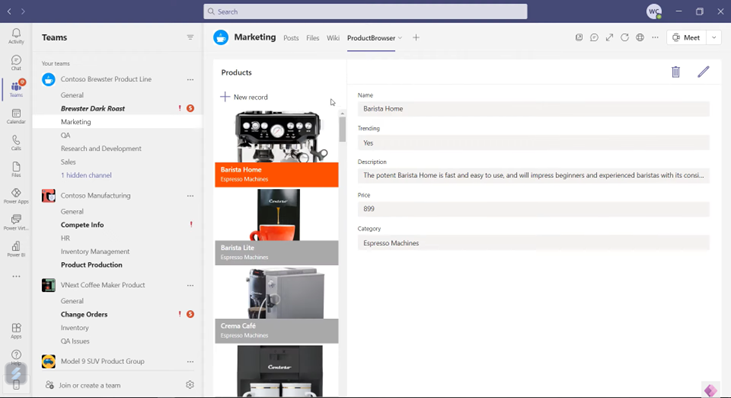
As your needs grow you can add users and data sources, move from SharePoint to Dataverse when the data gets more complex, and bring in professional developers to add code components or custom connectors where low-code alone isn't enough.
Frequently asked questions
Can I use Power Apps with my existing Microsoft 365 licences?
Yes, for apps that only use standard connectors such as SharePoint, Excel or Teams. Apps that use Dataverse, premium connectors or on-premises gateways need a premium Power Apps entitlement for each user.
How long does it take to build a Power App?
It depends on the scope. A focused app that replaces one form or spreadsheet is a much smaller job than a line-of-business system with several user groups and integrations. Defining the problem clearly and starting with one process is the quickest way to get something useful live.
Should my app use SharePoint or Dataverse?
SharePoint lists suit simpler apps and run on Microsoft 365 licences. Dataverse gives you relational data, stronger security at record and column level and business logic, and it is required for model-driven apps, but it needs premium licences. We usually decide this with you at the start, because it affects licensing and design.
Can Copilot help build Power Apps?
Yes. Copilot in Power Apps can generate tables and a canvas app from a description, and plans in Power Apps can propose a solution covering apps, flows and data. Both need an environment with Dataverse and are subject to regional availability.
Talk to us about your process
If you have a process that is held together by spreadsheets and email, we can help you decide whether Power Apps is the right fit and build it with you. Get in touch or read more about our Power Apps services.

/SharePoint%20Migration/Half-Screen-Image-Size-%20people%20writing%20on%20glass.png?width=800&name=Half-Screen-Image-Size-%20people%20writing%20on%20glass.png)
/Individuals%20working%20off%20different%20devices%20at%20a%20desk..png?width=800&name=Individuals%20working%20off%20different%20devices%20at%20a%20desk..png)