
.jpg?width=900&name=case%20study%20feature%20(100).jpg)
Our consultants' five favourite Power Pages features are web roles, Liquid templates, content snippets, the Web API and the built-in content delivery network (CDN) and Web Application Firewall (WAF). Between them they cover who can see what, how pages pull live data from Dataverse, how content is reused and how the site is kept fast and protected. This article was written by a technical consultant for readers comfortable with basic code and web terminology.
What is Power Pages?
Power Pages, formerly Power Apps portals, is Microsoft's low-code platform for building and hosting external websites on top of Microsoft Dataverse. Our article on Power Pages vs Power Apps portals covers the background.
The design studio lets people with limited coding experience build responsive pages from templates and components, and because the data lives in Dataverse, the same records can be used by your internal Power Apps, Power Automate flows and Dynamics 365.
How do web roles control access in Power Pages?
A web role is a collection of permissions to the content of your site. Web roles link site users (stored as Dataverse contact records) to table permissions and page permissions, and because a user can hold several web roles, their access is cumulative.
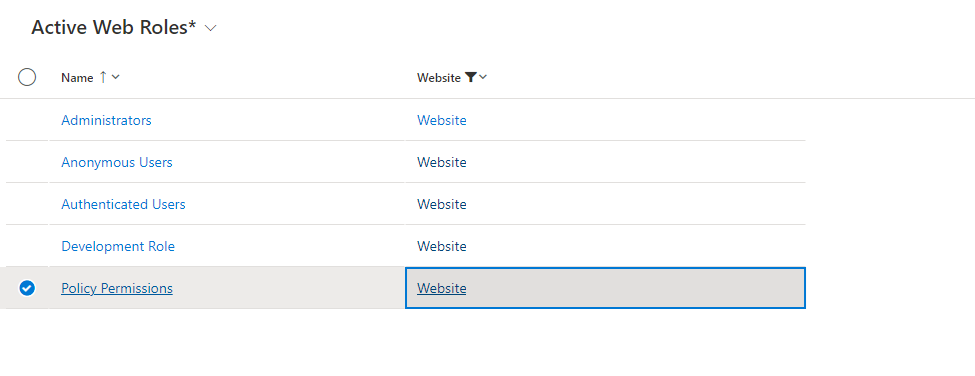
Every site has two special roles. All signed-in users get the Authenticated Users role, and visitors who aren't signed in get the Anonymous Users role. Anything you grant to Anonymous Users is effectively public, so be careful with it.
Access to Dataverse data is denied by default. To let a role see records through lists, forms, Liquid or the Web API, you create table permissions and associate them with web roles. Each table permission has an access type, such as Global, Contact, Account, Self or Parent/child, and privileges such as read, write, create and delete. Microsoft recommends relationship-based access types over Global for business data, because Global grants the role every record in the table. Page permissions then control who can view individual pages, and hiding a page from navigation does not secure it on its own.
On an education site, for example, a student role might only see that student's classes and assignments. If the student starts helping a teacher, adding a teacher role gives them extra permissions, such as updating class content, without touching the student role.
What can you do with Liquid templates?
Liquid is an open-source template language built into Power Pages. It is processed on the server, so the browser only receives plain HTML. Developers use it to:
- load a specific Dataverse record by ID using the
entitiesobject, for exampleentities.account['<record id>'] - query Dataverse with the
fetchxmltag and loop through the results, with table permissions still applied - render sections of a page conditionally, for example using the
has_rolefilter to show content only to users in a given web role - build reusable web templates and combine them with the
includeandextendstags, including custom headers, footers and full page layouts
Because the conditions are evaluated on the server, content and markup a user isn't meant to see are never sent to their browser in the first place.
How do content snippets help manage site content?
Content snippets are small pieces of editable content, of type Text or HTML, that a developer places in a header, footer, page or web template. You edit a snippet once and the change appears everywhere it is used, which is ideal for footer text, contact details, disclaimers or repeated product wording.
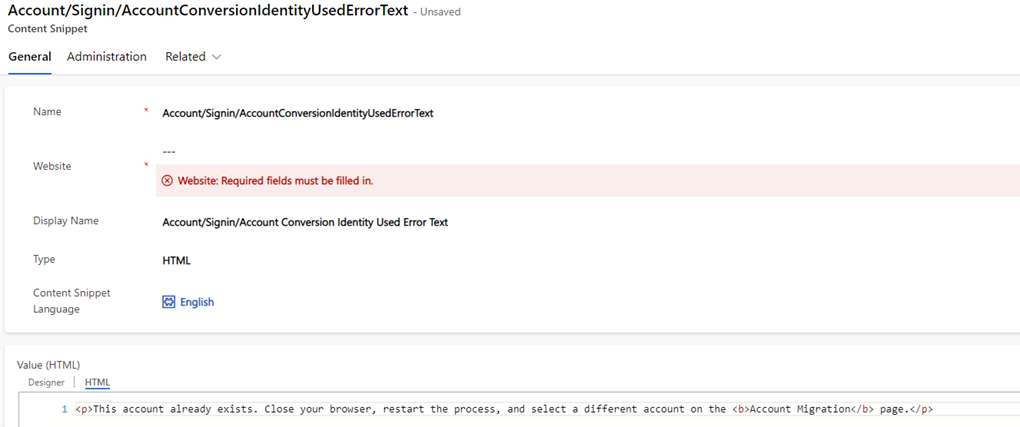
Snippets are created in the Portal Management app and can be placed with Liquid in three ways: {{ snippets["Footer"] }} to output the value, {% editable snippets 'Footer' %} to let content editors change it in place, or the built-in snippet web template, {% include 'snippet' snippet_name:'Footer' %}. A snippet's value can itself contain Liquid, so it can display Dataverse data, and each snippet can have a language set for multilingual sites.
What can the Power Pages Web API do?
The Web API lets client-side code work with Dataverse data without a full page reload, which gives developers much more control over how and when the user interacts with data. It supports reading records, creating records, updating and deleting records, and associating and disassociating related records, using a format kept as close as possible to the main Dataverse Web API.
It is switched off by default. You enable it per table with site settings, Webapi/<table>/enabled set to true and Webapi/<table>/fields listing the columns to expose, and every call respects the table permissions of the user's web roles. Microsoft has deprecated the wildcard (*) value for the fields setting, so if an older site uses it, those requests will fail until you list the columns explicitly. Only expose the tables and columns the site actually needs.
Third-party integrations such as payment providers follow a similar pattern: store the provider's JavaScript as a web file, wrap the integration in a web template and reuse it wherever it is needed.
How do the CDN and Web Application Firewall work in Power Pages?
Both features are powered by Azure Front Door, are included in Power Pages licensing at no extra cost, and are switched on by a site administrator. They are independent of each other, so you can switch on either one first. On a custom domain, the first time you switch either on triggers a one-off domain validation.
- Content delivery network. Static files such as images, scripts and style sheets are cached on edge servers close to your visitors. Only content that anonymous users can access is cached, and authenticated files are always served from the application server. The CDN isn't available for trial sites or in a small number of regions.
- Web Application Firewall. WAF runs in Prevention mode, blocking requests that match Microsoft's managed rule sets, which cover cross-site scripting, local and remote file inclusion, session fixation and protocol attacks. You can add custom rules to allow, block or rate-limit traffic by geography, IP address or request URI. The platform's own IP restriction setting isn't supported while WAF is on, so use WAF custom rules for IP filtering instead.
If you need more control than the built-in options give you, Power Pages also supports your own Azure Front Door profile or another CDN and WAF provider in front of the site.
Frequently asked questions
How is Power Pages licensed?
Power Pages is licensed by capacity, either authenticated users per website per month or anonymous users per website per month, as prepaid packs or pay-as-you-go. Internal users with a Power Apps per user licence or a qualifying Dynamics 365 enterprise licence can use Power Pages sites without extra capacity.
Do external users need a Power Apps licence to use a Power Pages site?
No. External users are covered by the site's authenticated or anonymous user capacity, so they don't need individual Power Apps licences.
Is Power Pages data secure by default?
Yes. Access to Dataverse records through lists, forms, Liquid and the Web API is restricted until you create table permissions and assign them to web roles. New sites are also only visible to internal users until you change the site visibility to public.
Planning a Power Pages site?
We build customer, partner and supplier sites on Power Pages, and support them once they are live. Find out more about our Power Pages services or contact us to discuss your requirements.

/SharePoint%20Migration/Half-Screen-Image-Size-%20people%20writing%20on%20glass.png?width=800&name=Half-Screen-Image-Size-%20people%20writing%20on%20glass.png)
/Individuals%20working%20off%20different%20devices%20at%20a%20desk..png?width=800&name=Individuals%20working%20off%20different%20devices%20at%20a%20desk..png)